
Custom file naming lets you decide exactly how your downloaded PDF report and ZIP archive are named. Instead of a fixed naming scheme, you build a pattern from tokens, and Forensic OSINT applies it when you download.
Applies to your PDF report and ZIP archive Custom file naming sets the name of the PDF report and ZIP archive you download, not the individual capture files inside the archive. Per-file naming is planned for a future release.
What Is Custom File Naming?
A token is a placeholder that Forensic OSINT swaps for real information when you download. You arrange the tokens in whatever order you want, add separators such as underscores between them, and the extension turns that pattern into the filename for your PDF report and ZIP archive.
For example, this pattern:
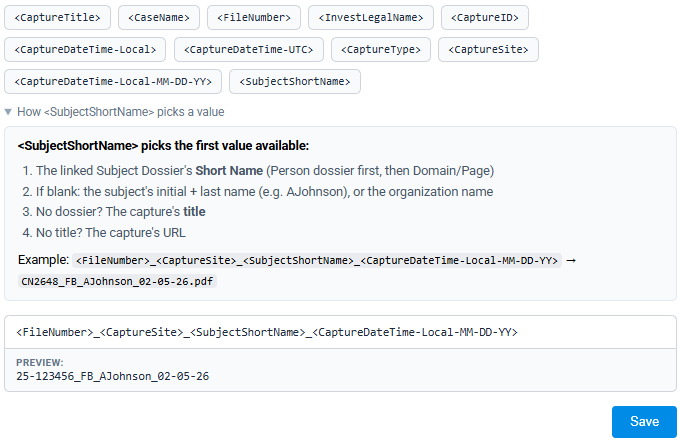
<FileNumber>_<CaptureSite>_<SubjectShortName>_<CaptureDateTime-Local-MM-DD-YY>becomes a file named:
CN2648_FB_AJohnson_02-05-26.pdfA live preview shows a real example as you build the pattern, so you always know what your filenames will look like before you save.
Available Tokens
You can combine any of the tokens below. Tap a token in the extension to add it to your pattern.
| Token | What it inserts |
|---|---|
<CaseName> | The optional Case Name set on the case. |
<FileNumber> | The case's file number. |
<CaptureTitle> | The title of the capture, usually the page title. |
<CaptureSite> | A short code for the source site, such as FB for Facebook. |
<SubjectShortName> | A short name for the linked subject. See how it picks a value below. |
<CaptureType> | The type of capture, such as a full page or single screen. |
<CaptureID> | The unique ID assigned to the capture. |
<InvestLegalName> | The investigator's legal name. |
<CaptureDateTime-Local> | The capture date and time in your local time zone. |
<CaptureDateTime-UTC> | The capture date and time in UTC. |
<CaptureDateTime-Local-MM-DD-YY> | The local capture date, formatted as MM-DD-YY. |
Build Your Filename
Open the file naming settings
In the extension, go to Settings and open the file naming options.
Add and arrange tokens
Tap the tokens you want in the order you want them, and type any separators between them, such as underscores or dashes. You can mix tokens with plain text.
Check the preview and save
The Preview line shows a real example of your filename. When it reads the way you want, click Save. Your PDF reports and ZIP archives use your pattern from then on.
How Subject Short Name Works
The <SubjectShortName> token picks the first value available, in this order:
- The linked Subject Dossier's Short Name (Person dossier first, then Domain or Page).
- If that is blank, the subject's initial and last name, such as AJohnson, or the organization name.
- If there is no dossier, the capture's title.
- If there is no title, the capture's URL.
Linking captures to a Subject Dossier gives you the cleanest, most consistent filenames, because the dossier's Short Name is used first.
Tips
Tip: Put the most useful sorting field first, such as <FileNumber> or <CaseName>, so your files group together the way you browse them.
Custom case naming and custom file naming work well together. If you use a free-form case number and Case Name, the <CaseName> and <FileNumber> tokens carry that straight into your filenames.
Related: Learn how to set a free-form case number and Case Name in the Custom Case Naming guide.