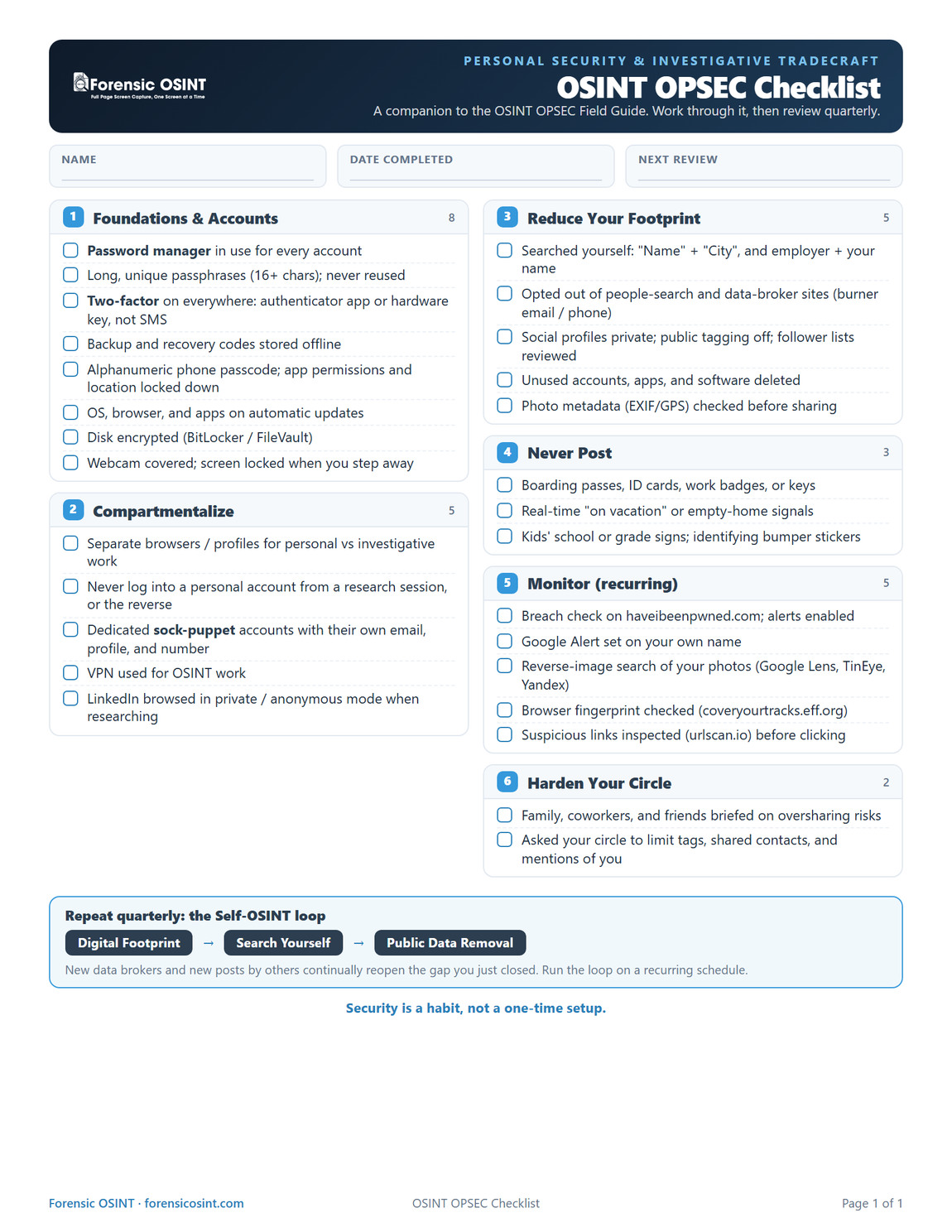

This is a working reference for anyone who does OSINT or investigative work and wants to keep their real identity separated from their research. Review and update it quarterly. Security is a habit, not a one-time setup.
01 Core Principles
Everything below is an application of a small number of ideas. Internalize these first.
- Compartmentalize. Use separate browsers, devices, and accounts for different life domains. Your personal life should never share a browser profile, email, or device with OSINT or investigative work. Why: a single slip-up, a logged-in account, an autofilled address, a synced bookmark, can bridge two identities that must stay unlinked.
- Security is a habit, not a project. There is no "done." Revisit accounts, permissions, and exposure on a recurring basis.
- Threat-model before you act. Ask two questions constantly: "What do I post online?" and "Who may want my information?"
- Gut-check before sharing. "What could a malicious actor do with this information?" Apply this filter to every photo, post, or form field before it goes out.
- Digital breadcrumbs. The more habitually private someone is, the harder they are to OSINT. It is habitual oversharing, not any single post, that makes a person easy to profile.
Personal life
- Personal browser & email
- Real-name accounts
- Home network
- Everyday device
share
Investigative work
- Dedicated research browser
- Sock-puppet personas
- VPN-masked session
- Separate device or VM
02 Personal Life Foundations
Baseline hygiene that applies whether or not you ever touch an investigation.
- Use a password manager (for example, Bitwarden) for everything.
- Build strong, unique passwords. Let your password manager generate long random passphrases (16+ characters), never reuse one across sites, and never build one from personal details, pet names, birthdays, sports teams, that already show up in your own social media.
- Enable two-factor authentication everywhere it is offered. Use an authenticator app or a hardware key (for example, YubiKey), not SMS. SMS codes are vulnerable to SIM-swapping. Store backup and recovery codes somewhere offline and secure.
- Set an alphanumeric phone passcode, not biometrics-only, and lock down app permissions and location access.
- Keep your OS, browser, and apps patched. Turn on automatic updates. Unpatched software is one of the most common entry points.
- Delete unused accounts properly. Assume everything you post on social media eventually goes public.
- Encrypt your disk. BitLocker on Windows, FileVault on Mac.
- Separate browsers by purpose. For example, Brave or Firefox for personal browsing; Chrome reserved only for OSINT work (or the reverse). The separation matters more than the specific tool.
- Cover your webcam and lock your screen every time you step away. Basic physical and device hygiene, not just passwords.
- Use incognito or private mode whenever you use someone else's computer.
- Google yourself. Search "Your Name" AND "City", and also search your employer's name alongside your own. Then opt out of people-search and data-broker sites using a burner email and phone.
- Audit your social media privacy settings. Set profiles to private, review your follower and friend lists, and disable public tagging. Do not rely on platform defaults.
- Harden your circle. Attackers often pivot through the least-secured person near you: family, coworkers, friends.
Practice security by absence: delete unused accounts, apps, and software. You cannot get hacked through what you do not have.
03 What Not to Post
Common, easy-to-miss oversharing patterns. Each one gives an attacker or a researcher a free data point.
- Photo metadata (EXIF/GPS). Depending on the device, camera app, permissions, and settings, photos may include GPS coordinates, timestamps, and device information. Check for sensitive metadata before sharing, especially in original files or photos taken at private locations.
- Boarding pass photos. The barcode encodes your name, departure and destination airport, and airline.
- ID cards, work badges, office keys. All aid social engineering and physical pretexting.
- "On vacation" photos. Announces that a home is empty, in real time.
- Back-to-school signs and Halloween porch photos. Often leak a child's full name, school, grade, or the house number and street. Crop tightly or shoot against a neutral backdrop.
- Bumper stickers. Ask "what am I driving around with?" School, sports team, union, or veteran-status stickers can identify you and your routine.
Social engineering example: something as innocuous as a "favourite band" answer in a casual post can be used to guess a security-question-based password reset.
Self-exposure checks
- Audit your public footprint. Search your name, email address, usernames, and common document titles to identify personal information or files that may be publicly accessible. Review sharing permissions on Google Drive, Dropbox, and similar services, and remove public access where it is not needed.
- Verify suspicious messages safely. Avoid opening unexpected links or attachments, even when a message appears urgent or comes from a familiar name. Confirm the sender through a separate channel, and inspect questionable links with a reputable URL-scanning service before visiting them.
- Monitor how your photos are being used. Periodically run reverse-image searches on profile photos and other identifiable images to find impersonation, unauthorized reposts, or scraped content. Report misuse and tighten privacy settings on the original accounts when necessary.
04 OSINT / Investigative Work Practices
Extra discipline layered on top of the personal-life baseline, specific to doing OSINT or investigative work.
Network & research hygiene
- Use dedicated sock-puppet accounts for research, never your personal or real-name accounts. Give each persona its own email, browser profile (or VM), and phone number where needed, and never log into a personal account from a research browser session, or vice versa.
- Use a VPN for OSINT work. Mask your investigative IP so targets and platforms cannot see your real location or ISP when you are researching them. Never research a subject on the same network session you use for personal browsing.
- Browse LinkedIn in private or anonymous mode when researching a subject. Otherwise your name or a generic profile shows up in their "who viewed your profile" list and tips them off.
Why sock puppets matter: your personal accounts carry your real identity, browsing history, ad-tracking profile, and social graph. Logging into even one of them mid-investigation, even by accident, can expose you to the subject or link your real identity to the case.
Attribution resistance
- Seed deliberate disinformation. Spelling variants of your name, fake profiles, inconsistent locations and usernames, to make attribution across your accounts harder.
- Reduce unnecessary links between identities. Avoid reusing the same usernames, profile photos, bios, recovery details, or location information across personal and research accounts. Keep each persona's accounts, contact details, and browsing environment separate.
- Delete dormant accounts. Old social profiles, email accounts, and unused apps can expose personal information, be taken over, or help others connect your current identities. Close accounts you no longer need and revoke their access to other services.
05 Verification & Monitoring Toolkit
A recurring checklist of sites and tools to audit your own exposure.
| Purpose | Tool | Notes |
|---|---|---|
| Breach exposure | haveibeenpwned.com | Check current exposure and sign up for ongoing breach notifications. |
| Reverse image search | images.google.com tineye.com yandex.com/images | Check whether your own photos have been reused or scraped elsewhere. |
| Browser fingerprinting | coveryourtracks.eff.org amiunique.org whoer.net | See how unique or trackable your browser configuration is. |
| App tracker & permission exposure | reports.exodus-privacy.eu.org | Audits trackers embedded in mobile apps. |
| Terms of Service review | tosdr.org | Plain-language summaries of what you are agreeing to. |
| Pull / delete your data | justgetmydata.com justdeleteme.xyz | Request your data or find deletion instructions per service. |
| Messenger comparison | securemessagingapps.com | Check before adopting a new messaging app. |
| Self-monitoring | Google Alerts | Set an alert on your own name to get emailed on new mentions. |
| URL safety check | urlscan.io | Inspect a suspicious link before clicking it. |
| Privacy-respecting search | search.brave.com startpage.com | Use instead of Google or Bing for sensitive searches. |
| Browser privacy add-ons | Privacy Badger, Ghostery, User Agent Switcher | Block trackers and reduce fingerprint uniqueness. |
06 The Self-OSINT Workflow
A simple, repeatable three-step mental model. Run it on yourself the same way you would run it on a subject.
Repeat this loop on a recurring schedule. Quarterly is reasonable. New data brokers and new posts by others continually reopen the gap you just closed.
07 Hardening Your Circle
You can lock down your own footprint perfectly and still be exposed by someone else.
- Educate family, coworkers, and friends. Attackers often pivot through the weakest-secured person near you rather than attacking you directly.
- Assume others will post about you. Tagged photos, shared contact lists, and casual mentions by people in your circle can undo your own opsec entirely.
Reference for sharing with family and friends: the "Data to Go" video is a good non-technical explainer for why their habits affect your exposure too.