
By default, Forensic OSINT builds case numbers from a Year and a File Number. If your organization already uses its own case-numbering system, you can turn on custom case naming and enter any case number you like.
Two Ways to Name a Case
Forensic OSINT gives you two ways to identify a case:
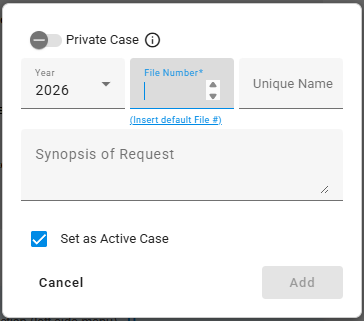
- Standard case numbering builds the case number from a Year and a File Number, with an optional unique name.
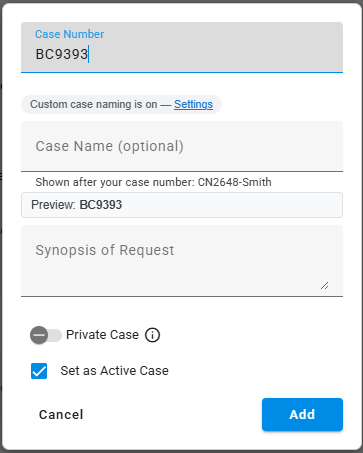
- Custom case naming lets you type any case number you want, such as BC9393 or an internal reference, plus an optional Case Name to label it.
Standard vs. Custom
Standard case numbering
Year plus File Number, with an optional unique name.
Custom case naming
Any case number you type, plus an optional Case Name.
Turn On Custom Case Naming
Open Settings
In the extension, open Settings and find the case naming option.
Turn on custom case naming
Switch custom case naming on. The next time you create a case, you'll see a Case Number field you can type freely, with a note that custom case naming is on and a Settings link to turn it back off.
Enter your case number
Type any case number your organization uses, such as BC9393. The Preview shows exactly how the case will read before you save, so what you type is what you get.
Adding a Case Name
With custom case naming on, you can also add an optional Case Name. The Case Name is shown after your case number to make cases easier to recognize at a glance, for example CN2648-Smith.
The Case Name is optional. Leave it blank if your case number already tells you everything you need.
Tips
Tip: Keep case numbers consistent across your team so cases sort and search predictably wherever they're stored.
Related: Your case number and Case Name can flow straight into your downloaded filenames. See the Custom File Naming How-To Guide.